
Technorati Tags: .NET,INotifyPropertyChanged,MVVM
Kevin Grossnicklaus gave a nice presentation on M-V-VM User Interface Patterns in Silverlight and WPF at last night's St. Louis .NET User Group meeting.
A key part of MVVM is implementation of the INotifyPropertyChanged interface to let views know that bound properties have changed. Here's a simplified version of a model class from the MSDN INotifyPropertyChanged documentation:
public class DemoCustomer : INotifyPropertyChanged
{
private Guid \_id = Guid.NewGuid();

public Guid ID

{

    get { return \_id; }

}

private string \_customerName;

public string CustomerName

{

    get { return \_customerName; }

    set

    {

        if (value != \_customerName)

        {

            \_customerName = value;

            NotifyPropertyChanged("CustomerName");

        }

    }

}

private string \_phoneNumber;

public string PhoneNumber

{

    get { return \_phoneNumber; }

    set

    {

        if (value != \_phoneNumber)

        {

            \_phoneNumber = value;

            NotifyPropertyChanged("PhoneNumber");

        }

    }

}

public event PropertyChangedEventHandler PropertyChanged;

private void NotifyPropertyChanged(string propertyName)

{

    if (PropertyChanged != null)

        PropertyChanged(this, new PropertyChangedEventArgs(propertyName));

}
}
That's a lot of repetitive typing for each of the notifying properties. Creating the properties can be simplified by creating a Visual Studio code snippet. I have one called "propn" for properties with notification:
propn propn Code snippet for property and backing field in class implementing INotifyPropertyChanged Brian Schroer Expansion type Property type string property Property name MyProperty notifyMethod name of method to raise PropertyChanged event NotifyPropertyChanged
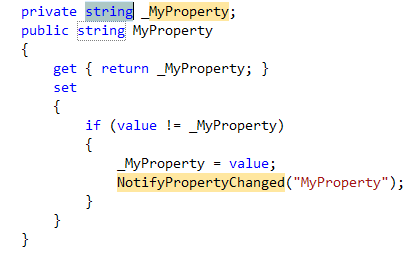
…so I can just type "propn" and hit tab-tab to display the snippet, with updatable fields for the property type and name. (The name of the method called to raise the PropertyChanged event is also updatable - You don't have to call it "NotifyPropertyChanged"):
If you haven't created your own code snippets before, you may be pleasantly surprised to find out how easy it is. There are plenty of built-in snippets to use as a starting point. Taking the time to build a snippet will pay off with a lot of time saved coding.
In my next post, I'll talk about how you can use generics and reflection to reduce the amount of code required for implementing "notifiable" properties.