
My XAML learning project is inspired by Leon Bambrick’s “World’s Simplest Code Generator” (http://secretgeek.net/wscg.htm). It’s a 3-pane window where you type or paste data into the top pane, enter a formatting pattern in the middle pane, and it displays the formatted results in the bottom pane:
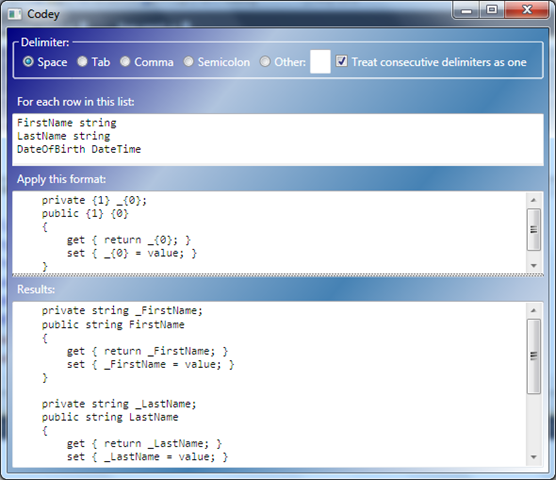
(Yes, I know about auto-implemented properties, Visual Studio snippets, and T4. The property-generating scenario above is just for example purposes.)
The TextBox controls are bound to properties of my ViewModel, but by default the input and format properties are only updated (triggering an update to the results property) when the controls lose focus.
I want the results to be updated immediately as I type, so I did that by handling the TextChanged events in code-behind. I knew there was probably a way to do it without code-behind, but didn’t know how until I watched Jason Dolinger’s M-V-VM video.
I added “UpdateSourceTrigger=PropertyChanged” to the binding expressions:
<TextBox DockPanel.Dock="Top" Text="{Binding InputText, UpdateSourceTrigger=PropertyChanged}" />
(http://11011.net/software/vspaste)
…and bada-bing, the results are now updated with each keystroke as I update the input and format, with no code-behind.
Treat code-behind like your real behind: You don’t want a lot of junk in the trunk!;)