
Let’s say you added a table to the database created in the previous post, with a foreign key relationship to the original table, like this:
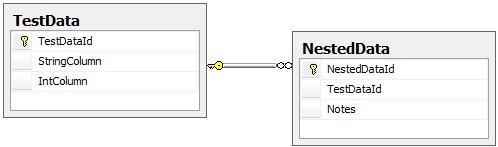
The idea here is that you can have multiple rows in NestedData for each single row in TestData. If you create a stored procedure (call it Get_NestedData) with the following select statement:
select TestData.TestDataId, StringColumn, IntColumn, Notes from TestData left outer join NestedData on TestData.TestDataId = NestedData.TestDataId where TestDataId = @TestDataId
...and generate your adapter schema, you’ll get a result something like this (simplified for clarity):
<StoredProcedureResultSet0 > <TestDataId>1</TestDataId> <StringColumn>Row Number 1</StringColumn> <IntColumn>111</IntColumn> <Notes>My first note</Notes> </StoredProcedureResultSet0> <StoredProcedureResultSet0 > <TestDataId>1</TestDataId> <StringColumn> Row Number 1</StringColumn> <IntColumn>111</IntColumn> <Notes>My second note</Notes> </StoredProcedureResultSet0> <StoredProcedureResultSet0 > <TestDataId>2</TestDataId> <StringColumn> Row Number 2</StringColumn> <IntColumn>222</IntColumn> <Notes>My third note</Notes> </StoredProcedureResultSet0>
When what you really want is something that looks like this:
<TestData> <TestDataId>1</TestDataId> <StringColumn>Row Number 1</StringColumn> <IntColumn>111</IntColumn> <NestedData> <Notes>My First Note</Notes> </NestedData> <NestedData> <Notes>My Second Note</Notes> </NestedData> </TestData> <TestData> <TestDataId>2</TestDataId> <StringColumn>Row Number 2</StringColumn> <IntColumn>222</IntColumn> <NestedData /> </TestData>
The solution for this is the SQL FOR XML AUTO command and a custom schema in BizTalk.
Add the following to the stored procedure above:
FOR XML AUTO, ELEMENTS, XMLSCHEMA
From the resulting xml, copying the schema elements (everything inside the xsd:schema tags) to Notepad. Find the line that says
schemaLocation="[http://schemas.microsoft.com/sqlserver/2004/sqltypes/sqltypes.xsd](http://schemas.microsoft.com/sqlserver/2004/sqltypes/sqltypes.xsd)"
and change it to
schemaLocation=" sqltypes.xsd"
Save this file as DemoSchema.xsd and import it into your BizTalk project. You’ll also need to add the sqltypes.xsd file that is referenced; you can obtain it at http://go.microsoft.com/fwlink/?LinkId=131087. Add a root node (name it Root) to DemoSchema and move the existing schema under it. Finally, click on the node and give it a Target Namespace of http:// WCF-SQLTest/namespace.
Now, you’ll run the Consume Adapter Service Add-in to generate the schema for the Get_NestedData stored procedure. This time however, be sure to select Procedures rather than TypedProcedures.
Create an orchestration the same way you did in the previous post, but this time your Response message will be the DemoSchema rather than the generated schema. Once everything is wired up properly, build and deploy.
In the BizTalkServer Administration console, configure the two one-way ports the same as you did in the previous post. Then create a WCF-SQL send/receive port, with the following modifications to the way it was previously done:
General tab:
- Action: XmlProcedure/dbo/Get_NestedData
Bindings tab:
- XmlStoredProcedureRootNodeName: Root
- XmlStoredProcedureRootNodeNamespace: http:// WCF-SQLTest/namespace
Configured the orchestration, fire up the application, drop your request message in and examine the response – it should be nicely nested XML like the example shown above.