
The default NuGet template for MVC3 pushes down jQuery 1.5.1. You can upgrade to a new version (1.7.1 is current when this was written) to avoid a problem with the creation of “unknown” HTML5 tags in IE6-8:
Take this sample HTML page using HTML5Shiv to provide support for new HTML5 tags in IE6 – IE8. The page has a number of
tags that are backwards compatible in Internet Explorer 6-8 thanks to the HTML5Shiv.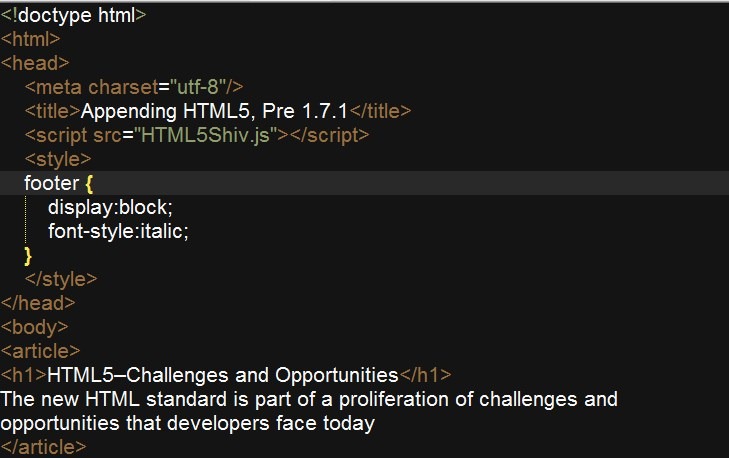
After the article elements there is a jQuery 1.5.1 script tag, and a ready() event handler that appends a footer element with a copyright to each of the article tags.
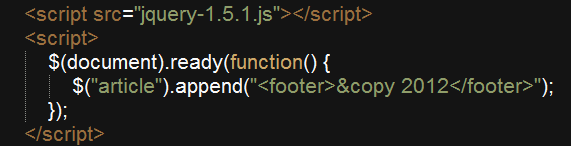
This appears correctly in IE9, but in older IE browsers the unknown tag problem reappears for the dynamic
elements, even though we have the HTML5Shiv at the top of the page. The copyright text sits outside of the two separate footer tags.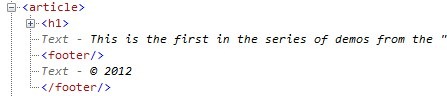
To solve the issue upgrade your jQuery files to an up-to-date version. For instance in Visual Studio 2010:
- In the Solution Explorer right click on References and choose Manage NuGet Packages.
- In the Manage NuGet Packages window select the jQuery item on the middle of the page and click the “Upgrade” button.
- You may need to upgrade your script src references to point at the new version.
Using the updated jQuery library the incorrect tags should disappear and styles should work properly:

You can find more information about the issue on the jQuery Bug Tracker site.