
Store your App.Config inside SQL Server 2005
I did submit some time ago a little fix for the Enterprise Library **The links are working again** Sam Gentile did not give up until I resubmitted the sample code Code Gallyery!(/Providers/BlogEntryEditor/FCKeditor/editor/images/smiley/msn/regular_smile.gif)**. but I did not yet have time to blog about it. Better late than never I want to shed some light (again) on configuration. To get your application settings from your local disk you can use the.NET ConfigurationManager class or the (Entlib) FileConfigurationSource to fetch the settings from another file than your App.Config file. The Enterprise Library SqlConfigurationManager is the counterpart to the.NET ConfigurationManager class and can be directly used from any application that cares about central configuration. To use it you need a running SQL Server 2005 (Express) server and a database which contains some stored procedures which are responsible for reading and writing ConfigurationSections. The following code sample shows you how to get your settings with only a few lines of code from SQL server.
SettingsDialog.cs (Part of SqlConfigConverter Project)
public partial class SettingsDialog: Form
{
const string GetConfig = "EntLib_GetConfig";
const string SetConfig = "EntLib_SetConfig";
const string RefreshSection = "UpdateSectionDate";
const string RemoveSection = "EntLib_RemoveSection";
SqlConfigurationData SqlConnectData;
const string ClientSettingsSection = "ClientSettings";
CustomConfigurationSection SqlSection; // Loaded ConfigurationSection from SQL Server
public SettingsDialog
{
// Build our Sql Connection data
SqlConnectData = new SqlConfigurationData(Settings.Default.ConnectionString,
GetConfig, SetConfig, RefreshSection, RemoveSection);
// Retrieve data from SQL Server
SqlSection = SqlConfigurationManager.GetSection(ClientSettingsSection, SqlConnectData) as CustomConfigurationSection;
}
}
Client Application Sample
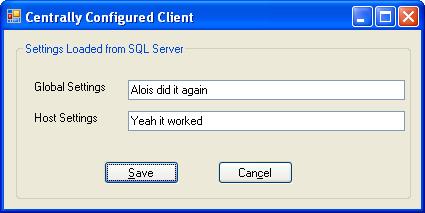
It really feels the same like App.Config and it nearly is, only better. You can call SqlConfigurationManager.GetSection and get your ConfigurationSectionderived config object back from SQL server. What is really cool about this source is that the returned objects are not immutable like the ones returned by the ConfigurationManager. This relieves you from the burden to create every time a new instance of the configuration object when you want to save a changed configuration object.
Inner Workings of the SqlConfigurationSource The import mechanism is as simple as elegant: Split the App.Config file into its parts (Sections and Serialized data). This enables you to store the config data in SQL server in a table that contains the Section Name, Type, Serialized object and its last modification time (required for section update) as columns. The table below shows an example what you would expect to see if you browse your database. A very good tool to do so is the Microsoft SQL Server Management Studio Express application which helps you to browse and diagnose your databases and tables.
Section Name ConfigurationSection Type Serialized XML Node ClientSettings SqlSettingsClient.CustomConfigurationSection,
SqlSettingsClient, Version=1.0.0.0,Culture=neutral,
PublicKeyToken=null
<ClientSettings globalSettings="Some Global Settings" hostSettings="Host Relevant Settings"/>
...........
When you call SqlConfigurationManager.GetSection the Entlib_GetConfig stored procedure is called which does fetch the type and serialized XML node and returns it to the SqlConfigurationManager. He does deserialize the object and returns it back to you. There is a problem in the de/serialization code with the released SqlConfigurationSource which insisted that the type had to be derived from SerializableConfigurationSection which is an abstract Enterprise Library base class. This restriction did prevent the Data Access application block from working and of course every other existing ConfigurationSection derived config class. My patch does remove this annoying restriction and gives you the flexibility you need to do create more advanced tools.
Make the App.Config import Easier: SQL Server Importer To make it really easy to import your App.Config settings programatically I did write a small tool that allows you to import any section of an App.Config into SQL server.
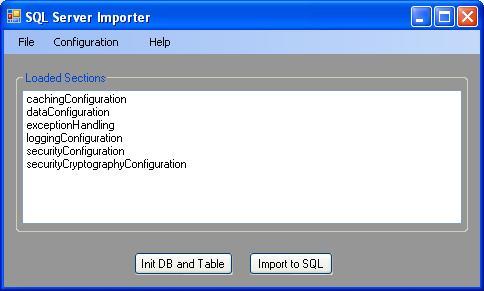
The source code for the importer and a sample client application can be found at. What is noteworthy about this tool is that it does not simply load and save xml but it loads the real ConfigurationSection objects defined by any application. This enables data validation at import time which is a bonus. This explains why the tool asks you for the assembly with the data types it finds in the App.Config file. The type discovery is done by my Assembly Resolve Dialog which I did already submit as patch to the Enterprise Library configuration console.
Enterprise Library IConfigurationSource and Writing Configuration Data Perhaps I should start with the concept how the application block in the Enterprise Library are configured. The root of all evil is the IConfigurationSource interface which does abstract the application blocks from the storage location. They receive via ObjectBuilder only the Interface but not any concrete class implementation. The Logging Application Block for example can be configured from an arbitrary configuration file with this code:
LogWriter writer = null;
FileConfigurationSource source = new FileConfigurationSource(@"C:\Shared.config");
factory = new LogWriterFactory(source);
writer = factory.Create;The LogWriterFactory does take only the IConfigurationSource interface and instantiates the LogFormatterCustomFactory which does call GetSection to retrieve the logging settings. This approach does work for all application blocks which are configured via the graphical Enterprise Library Configuration Tool. The config tool is the only one which does ever write the configuration. This is nice and does work very well if you do configuration exclusively via the supplied tool. But if you ever want to change the configuration inside your own application (configuration dialog) you will very soon notice that something is missing. You have the IConfigurationSource interface to read/write your settings. Add/Remove is here so lets start coding. I want to add my own ConfigurationSection derived config object so I have to call Add:
void Add(IConfigurationParameter saveParameter, string sectionName, ConfigurationSection configurationSection);
Hm I have to supply some IConfigurationParameter. No problem, lets have a look at its methods
public interface IConfigurationParameter
{
}
Ok now I have a problem. How am I supposed to write to an abstract repository I should know nothing about it? Answer: You have to know with what source you are dealing to be able to write to it. The IConfigurationSource does abstract you nicely when you read only your config objects but breaks polymorphism when you want to write your configuration. I hope this design flaw will be fixed in the next release of the Enterprise Library.
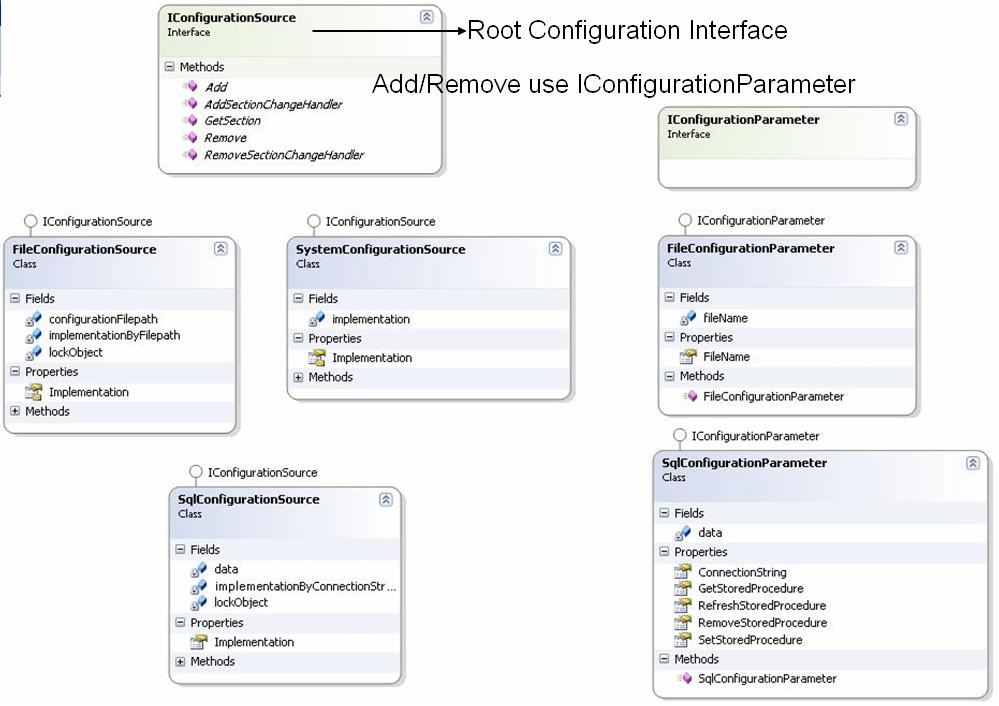
What I really would like is an interface that allows a transparent way to retrieve and save configuration settings. I might have overlooked some issues but I think that the following interface proposal would make the work for the applications much easier if they want to Save/Enumerate or Save to another Source configuration data without knowing what implementation it currently using.
Proposal for a new IConfigurationSource
using System;
using System.Configuration;
namespace Configuration
{
///
/// Abstract interface that does allow a transparent read and write of ConfigurationSections regardless
/// of the source.
///
public interface IConfigurationSource: IEnumerable<ConfigurationSection>
{
ConfigurationSection GetSection(string sectionName);
void Remove(string sectionName);
void Add(string sectionName, ConfigurationSection dataObject);
void Update(string sectionName, ConfigurationSection dataObject);
void Save;
void SaveTo(IConfigurationSource otherSource);
// Notification Services
void AddSectionChangeHandler(string sectionName, ConfigurationChangedEventHandler handler);
void RemoveSectionChangeHandler(string sectionName, ConfigurationChangedEventHandler handler);
}
}
It is amazing how much one can write/think about this "small" topic configuration. But for now I think there is enough information out there to get the work done. The next time I will show you how to improve the speed of your applications by optimizing your string handling/formatting.