
Vitaly Dilmukhametov

  Home  |   Contact  |   Syndication    |   Login
  17 Posts | 0 Stories | 67 Comments | 0 Trackbacks

News

Archives

Post Categories

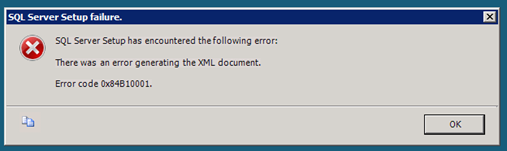
Environment: Windows server 2008 Web Edition + IIS7 + .net 3.5sp1. I had following error while trying to install SQL 2008 express:
image[6]

It happens after click on “Install” button, when setup collected all necessary info, such as installation path, db server settings, etc. Google found 20+ topics on forums, newsgroups and ms connect, but they hasn’t solutions, or solution is for CTP version of SQL 2008. I start setup with admin privilegies, update windows server, repair .net installation – it’s useless.

Here is part of log file, generated by setup bootstrap:

2009-09-26 13:59:40 Slp: Exception type: Microsoft.SqlServer.Chainer.Infrastructure.ChainerInfrastructureException
2009-09-26 13:59:40 Slp:     Message:
2009-09-26 13:59:40 Slp:         There was an error generating the XML document.
2009-09-26 13:59:40 Slp:     Stack:
2009-09-26 13:59:40 Slp:         at Microsoft.SqlServer.Chainer.Infrastructure.DataStoreService.SerializeObject(String rootPath, Object objectToSerialize, Boolean saveToCache)
//... here is details of stack trace...............................
2009-09-26 13:59:40 Slp:                 at Microsoft.SqlServer.Chainer.Infrastructure.DataStoreService.SerializeObject(String rootPath, Object objectToSerialize, Boolean saveToCache)
2009-09-26 13:59:40 Slp:         Inner exception type: System.Security.Cryptography.CryptographicException
2009-09-26 13:59:40 Slp:            Message:
2009-09-26 13:59:40 Slp:                         Access is denied.
2009-09-26 13:59:40 Slp:                        
2009-09-26 13:59:40 Slp:             Stack:
2009-09-26 13:59:40 Slp:                         at System.Security.Cryptography.ProtectedData.Protect(Byte[] userData, Byte[] optionalEntropy, DataProtectionScope scope)
//… other details of stack trace...............................

I notice following string: “Message: Access is denied”. Ok, my Administrator user don’t have some permissions. I did not spend a lot of time to search, what are this permissions, because my server will work in “demo” mode for a short period of time. I need SQL 2008 right now on my server, and I try to create new windows user, to add him to Admin group, and run the setup of database server under this user. And it’s working! I successfully install SQL 2008 and Management Studio Express. This workaround is useful for me.

P.S. May be, you know better way to workaround this issue? If so, write it in comment or directly to me by e-mail: vitusmail__[at]__ NOSPAM_gmail_[dot]_com

posted on Saturday, September 26, 2009 10:26 AM

Feedback

# re: Workaround for SQL 2008 express installation error 0x84B10001 12/3/2009 1:22 AM luis
Its the first workaround im able to find after searching for hours, im having the same problem, tomorrow i will try it and give you my feedback.

Thanks

# re: Workaround for SQL 2008 express installation error 0x84B10001 12/3/2009 1:40 AM Vitaly Dilmukhametov
Good luck, Luis! :)

# re: Workaround for SQL 2008 express installation error 0x84B10001 12/8/2009 8:28 AM chevalry
The same problem! And I don't know what to do also. Very interesting in silution...

# re: Workaround for SQL 2008 express installation error 0x84B10001 12/8/2009 8:45 AM chevalry
As I see, you are Russian. Look there:
http://www.gotdotnet.ru/blogs/GRP/2855/

# re: Workaround for SQL 2008 express installation error 0x84B10001 12/8/2009 8:59 AM Vitaly Dilmukhametov
Thank you for reply, chevalry!
http://www.gotdotnet.ru/blogs/GRP/ is my russian blog :)

# re: Workaround for SQL 2008 express installation error 0x84B10001 1/7/2010 2:32 PM Guod
I was recieving the same exact issue where I was unable to install a SQL Server 2005 Express SP3 or SQL Server 2008 Express SP1 Instance on a client's Windows 7 machine.

The user was a Local Administrator and had full permissions to the machine itself, we created a new user like your workaround suggests and we were able to successfully install SQL SErver 2008 Express SP1 on the machine.

Thank you, thank you, Thank you, THANK YOU!

# re: Workaround for SQL 2008 express installation error 0x84B10001 4/15/2010 3:44 PM Soufiane
thank youuuuuuuuu !!

# re: Workaround for SQL 2008 express installation error 0x84B10001 6/10/2010 4:54 AM PETER
PLEASE HELP

# re: Workaround for SQL 2008 express installation error 0x84B10001 8/31/2010 11:39 PM Lincoln
Thank you very much. This worked!

# re: Workaround for SQL 2008 express installation error 0x84B10001 9/16/2010 1:12 AM Matthieu
Hi,

Thanks for the initial solution, it does work for me.

The funny thing is that I first tried the installation with an admin user and it failed. I've then followed the advice and created another admin user and it worked!

Good stuff, thanks very much.

Matthieu

# re: Workaround for SQL 2008 express installation error 0x84B10001 5/18/2011 12:19 PM Greg
I got the same error on Windows Server 2008 R2 Enterprise trying to install SQL Server 2008 R2 Standard with the local Windows administrator account. I had to create a new User in Windows called "admin" and install SQL Server with this user.

# re: Workaround for SQL 2008 express installation error 0x84B10001 6/4/2011 10:18 AM siddharth
It WOrked for me... Thanks...

# re: Workaround for SQL 2008 express installation error 0x84B10001 7/10/2011 11:04 AM epeneth
when i installed sql server 2008 free edition in windows 7 32 bit os i recieve error generating xml document

# re: Workaround for SQL 2008 express installation error 0x84B10001 8/25/2011 2:50 PM santosh patkar
Environment: Windows server 2008 Web Edition + IIS7 + .net 3.5sp1. I had following error while trying to install SQL 2008 express:


# re: Workaround for SQL 2008 express installation error 0x84B10001 9/7/2011 3:25 PM Andreas
Logon with local admin does the trick. Thank you very much for helping me saving hours of searching.

# re: Workaround for SQL 2008 express installation error 0x84B10001 9/13/2011 3:53 PM Rakesh Kumar
This workaround help in solving the problem. Thanks a lot.
But anyone please tell what is the exact problem? and Microsoft is doing anything to resolve this problem or not?

# re: Workaround for SQL 2008 express installation error 0x84B10001 10/18/2011 7:30 AM Larry
This worked for me.

To resolve the issue, please follow these steps:

Click 'Start' > 'Run'
Type 'Regedit'
Go to 'HKEY_CURRENT_USER\Software\Microsoft\Windows\CurrentVersion\Explorer\User Shell Folders'
Verify 'AppData' is existing. If it is not there, please create a Expandable String Value with name 'AppData', and value '%USERPROFILE%\Application Data'

# re: Workaround for SQL 2008 express installation error 0x84B10001 2/15/2012 11:05 PM Renga
Thank you very much !!! This worked for me..

Post A Comment
Title:
Name:
Email:
Website:
Comment:
Verification:
