
A few days ago I wrote about issues I was having with Mage and click once. Basically, I was always getting the following when I'd try to install the click once application:
PLATFORM VERSION INFO
Windows : 5.2.3790.131072 (Win32NT)
Common Language Runtime : 2.0.50727.1433
System.Deployment.dll : 2.0.50727.1433 (REDBITS.050727-1400)
mscorwks.dll : 2.0.50727.1433 (REDBITS.050727-1400)
dfdll.dll : 2.0.50727.1433 (REDBITS.050727-1400)
dfshim.dll : 2.0.50727.1433 (REDBITS.050727-1400)
SOURCES
Deployment url : https://myurll/builds/myapp/ClickOnceTrial.application
Server : Microsoft-IIS/6.0
X-Powered-By : ASP.NET
Deployment Provider url : https://myurl/builds/myapp/ClickOnceTrial.application
Application url : https://myurl/builds/myapp/ClickOnceTrial/ClickOnceTrial.exe.manifest
Server : Microsoft-IIS/6.0
X-Powered-By : ASP.NET
IDENTITIES
Deployment Identity : ClickOnceTrial.app, Version=1.0.0.0, Culture=neutral, PublicKeyToken=13376ffc050464a3, processorArchitecture=msil
Application Identity : ClickOnceTrial.exe, Version=1.0.0.0, Culture=neutral, PublicKeyToken=13376ffc050464a3, processorArchitecture=msil, type=win32
APPLICATION SUMMARY
* Installable application.
ERROR SUMMARY
Below is a summary of the errors, details of these errors are listed later in the log.
* Activation of https://myurl/builds/myapp/ClickOnceTrial.application resulted in exception. Following failure messages were detected:
+ Reference in the manifest does not match the identity of the downloaded assembly ClickOnceTrial.exe.
COMPONENT STORE TRANSACTION FAILURE SUMMARY
No transaction error was detected.
WARNINGS
There were no warnings during this operation.
OPERATION PROGRESS STATUS
* [12/4/2007 1:56:12 PM] : Activation of https://myurl/builds/myapp/ClickOnceTrial.application has started.
* [12/4/2007 1:56:13 PM] : Processing of deployment manifest has successfully completed.
* [12/4/2007 1:56:13 PM] : Installation of the application has started.
* [12/4/2007 1:56:13 PM] : Processing of application manifest has successfully completed.
* [12/4/2007 1:56:16 PM] : Request of trust and detection of platform is complete.
ERROR DETAILS
Following errors were detected during this operation.
* [12/4/2007 1:56:17 PM] System.Deployment.Application.InvalidDeploymentException (RefDefValidation)
- Reference in the manifest does not match the identity of the downloaded assembly ClickOnceTrial.exe.
- Source: System.Deployment
- Stack trace:
at System.Deployment.Application.DownloadManager.ProcessDownloadedFile(Object sender, DownloadEventArgs e)
at System.Deployment.Application.FileDownloader.DownloadModifiedEventHandler.Invoke(Object sender, DownloadEventArgs e)
at System.Deployment.Application.FileDownloader.OnModified()
at System.Deployment.Application.SystemNetDownloader.DownloadSingleFile(DownloadQueueItem next)
at System.Deployment.Application.SystemNetDownloader.DownloadAllFiles()
at System.Deployment.Application.FileDownloader.Download(SubscriptionState subState)
at System.Deployment.Application.DownloadManager.DownloadDependencies(SubscriptionState subState, AssemblyManifest deployManifest, AssemblyManifest appManifest, Uri sourceUriBase, String targetDirectory, String group, IDownloadNotification notification, DownloadOptions options)
at System.Deployment.Application.ApplicationActivator.DownloadApplication(SubscriptionState subState, ActivationDescription actDesc, Int64 transactionId, TempDirectory& downloadTemp)
at System.Deployment.Application.ApplicationActivator.InstallApplication(SubscriptionState& subState, ActivationDescription actDesc)
at System.Deployment.Application.ApplicationActivator.PerformDeploymentActivation(Uri activationUri, Boolean isShortcut, String textualSubId, String deploymentProviderUrlFromExtension)
at System.Deployment.Application.ApplicationActivator.ActivateDeploymentWorker(Object state)
COMPONENT STORE TRANSACTION DETAILS
No transaction information is available.
It didn't matter what we did. We ALWAYS received that error message. The odd thing was that we had just moved to Visual Studio 2008 and things had been working GREAT using Visual Studio 2005. We're doing our building using MSBuild and CruiseControl.Net and the mage lines looked like the following:
<Exec Command\="mage.exe -New Application -FromDirectory $(CurrentDeployDir) -ToFile $(CurrentDeployDir)\\MyApp.exe.manifest -Name "MyApp" -Version $(BuildLabel) -TrustLevel FullTrust"/>
<Exec Command\="mage.exe -Sign $(CurrentDeployDir)\\MyApp.exe.manifest -CertFile $(DeployDir)\\certFile.pfx -Password mypassword"/>
<Exec WorkingDirectory\="$(DeployTempDir)" Command\="mage.exe -New Deployment -ToFile MyApp.application -Version $(BuildLabel) -Name "MyApp" -providerUrl https://myurl/builds/myapp/myapp.application -AppManifest $(BuildLabel)\\myapp.exe.manifest"\></Exec\>
<Exec Command\="mage.exe -Sign $(DeployTempDir)\\MyApp.application -CertFile $(DeployDir)\\certFile.pfx -Password mypassword"\></Exec\>
So we made a simple sample application to see if we could reproduce it and using MageUI we were able to cause it to happen, and so was Microsoft!
After about 8 hours on the phone and many more hours by Ravi, who did a great job, we figured out that a new feature of Visual Studio 2008 was causing problems. Basically, VS 2008 can embed a manifest inside of an assembly. Mage was somehow using this manifest in it's manifest generation, resulting in a duplicate manifest being created. As soon as we changed the build to no longer embed the manifest, it worked fine!
Go to the application's properties and under the application tab you'll see this:
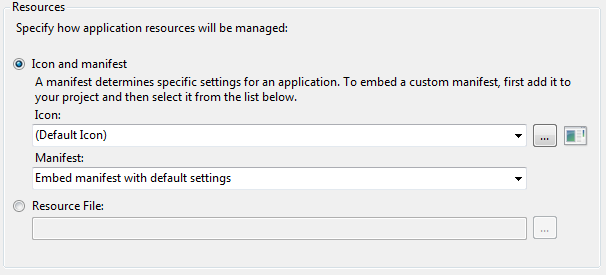
To fix the problem, change the second combo box to be this:

Save and you should be up and running again.
Before you make the change, this is what the main property group looks like:
<PropertyGroup> <Configuration Condition=" '$(Configuration)' == '' ">Debug</Configuration> <Platform Condition=" '$(Platform)' == '' ">AnyCPU</Platform> <ProductVersion>9.0.21022</ProductVersion> <SchemaVersion>2.0</SchemaVersion> <ProjectGuid>{9337119A-578C-4DE4-A9E0-697DBB7FD7CD}</ProjectGuid> <OutputType>WinExe</OutputType> <AppDesignerFolder>Properties</AppDesignerFolder> <RootNamespace>ClickOnceTrial</RootNamespace> <AssemblyName>ClickOnceTrial</AssemblyName> <TargetFrameworkVersion>v3.0</TargetFrameworkVersion> <FileAlignment>512</FileAlignment> <ProjectTypeGuids>{60dc8134-eba5-43b8-bcc9-bb4bc16c2548};{FAE04EC0-301F-11D3-BF4B-00C04F79EFBC}</ProjectTypeGuids> <WarningLevel>4</WarningLevel> </PropertyGroup>
After making the change, it now looks like this:
<PropertyGroup> <Configuration Condition=" '$(Configuration)' == '' ">Debug</Configuration> <Platform Condition=" '$(Platform)' == '' ">AnyCPU</Platform> <ProductVersion>9.0.21022</ProductVersion> <SchemaVersion>2.0</SchemaVersion> <ProjectGuid>{9337119A-578C-4DE4-A9E0-697DBB7FD7CD}</ProjectGuid> <OutputType>WinExe</OutputType> <AppDesignerFolder>Properties</AppDesignerFolder> <RootNamespace>ClickOnceTrial</RootNamespace> <AssemblyName>ClickOnceTrial</AssemblyName> <TargetFrameworkVersion>v3.0</TargetFrameworkVersion> <FileAlignment>512</FileAlignment> <ProjectTypeGuids>{60dc8134-eba5-43b8-bcc9-bb4bc16c2548};{FAE04EC0-301F-11D3-BF4B-00C04F79EFBC}</ProjectTypeGuids> <WarningLevel>4</WarningLevel> <NoWin32Manifest>true</NoWin32Manifest> </PropertyGroup>
So you could manually add the NoWin32Manifest property and it would also make it work.
Hopefully this will save someone else a little time.