
This example demonstrates how to upload image using the FileUpload control and store the uploaded file in the database in binary format.
STEP 1: Creating the Database.
The following are the basic steps on how to create a simple database in the Sql Server:
- Launch Sql Server Management Studion Express and then connect
- Expand the Databases folder from the Sql Server object explorer
- Right click on the Databases folder and select “New Database”
- From the pop up window, input the database name you like and click add
- Expand the Database folder that you have just added
- Right click on the Tables folder and select “New Table”
- Then add the following fields below:
_2.jpg)
Note: in this demo, I set the Id to auto increment so that the id will be automatically generated for every new added row. To do this select the Column name “Id” and in the column properties set the “Identity Specification” to yes.
Then after adding all the necessary fields, name your Table the way you like. Note that in this demo I name it “TblImages”
STEP 2: Setting up the WebForm (UI)
For the simplicity of this demo, I set up the UI like this below:
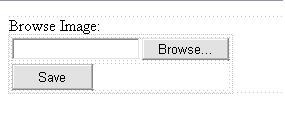
STEP3: Setting up the Connection String
In your web.config file set up the connection string there as shown below:
<connectionStrings> <add name="MyConsString" connectionString="Data Source=YourServerName; Initial Catalog=MyDatabase; Integrated Security=SSPI;" providerName="System.Data.SqlClient" /> </connectionStrings>
Note: MyConsString is the name of the Connection string that we can use as a reference in our codes for setting the connection string later.
STEP 4: Storing the binary image to database.
Here are the code blocks below:
private void StartUpLoad()
{

    //get the image file that was posted (binary format)
    byte\[\] theImage = new byte\[FileUpload1.PostedFile.ContentLength\];
    HttpPostedFile Image = FileUpload1.PostedFile;
    Image.InputStream.Read(theImage, 0, (int)FileUpload1.PostedFile.ContentLength);
    int length = theImage.Length; //get the length of the image
    string fileName = FileUpload1.FileName.ToString(); //get the file name of the posted image
    string type = FileUpload1.PostedFile.ContentType; //get the type of the posted image
    int size = FileUpload1.PostedFile.ContentLength; //get the size in bytes that
    if (FileUpload1.PostedFile != null && FileUpload1.PostedFile.FileName != "")
    {
        //Call the method to execute Insertion of data to the Database
        ExecuteInsert(theImage, type, size, fileName, length);
        Response.Write("Save Successfully!");
    }
}

public string GetConnectionString()
{
    //sets the connection string from your web config file "ConnString" is the name of your Connection String
    return System.Configuration.ConfigurationManager.ConnectionStrings\["MyConsString"\].ConnectionString;
}

private void ExecuteInsert(byte\[\] Image, string Type, Int64 Size, string Name, int length)
{
    SqlConnection conn = new SqlConnection(GetConnectionString());
    string sql = "INSERT INTO TblImages (Image, ImageType, ImageSize, ImageName) VALUES "

                + " (@img,@type,@imgsize,@imgname)";
    try
    {
        conn.Open();
        SqlCommand cmd = new SqlCommand(sql, conn);
        SqlParameter\[\] param = new SqlParameter\[4\];

        param\[0\] = new SqlParameter("@img", SqlDbType.Image, length);
        param\[1\] = new SqlParameter("@type", SqlDbType.NVarChar, 50);
        param\[2\] = new SqlParameter("@imgsize", SqlDbType.BigInt, 9999);
        param\[3\] = new SqlParameter("@imgname", SqlDbType.NVarChar, 50);

        param\[0\].Value = Image;
        param\[1\].Value = Type;
        param\[2\].Value = Size;
        param\[3\].Value = Name;

        for (int i = 0; i < param.Length; i++)
        {
            cmd.Parameters.Add(param\[i\]);
        }

        cmd.CommandType = CommandType.Text;
        cmd.ExecuteNonQuery();
    }
    catch (System.Data.SqlClient.SqlException ex)
    {
        string msg = "Insert Error:";
        msg += ex.Message;
        throw new Exception(msg);
    }
    finally
    {
        conn.Close();
    }
}

protected void Button1\_Click(object sender, EventArgs e)
{
    StartUpLoad();
}
StartUpload() is method that gets all the necessary information from the uploaded file such as the image length, size, type, filename and the image itself in a binary format.
GetConnectionString() is a method that returns the connection string that was set up from the web.config file.
ExecuteInsert() is a method that will executes the insertion of data to the database. This method takes all the necessary data to be inserted in the database.
As you can see the code above is pretty straight forward and self explanatory.
Check out my next example about "
Displaying Image to Image Control based on User Selection in ASP.NET
"
I hope you will find this example useful!