
String.Replace() in XSLT

Here's a sample template that lets you have the String.Replace() functionality in XSLT 1.0.   The template "string-replace-all" takes 3 parameters and recursively processes the input text string.

  •      text         : main string
  •      replace : the string fragment to be replaced
  •     by           :  the replacement string
     
 <xsl:template name="string-replace-all">
    <
xsl:param name="text" />
    <
xsl:param name="replace" />
    <
xsl:param name="by" />
    <
xsl:choose>
      <
xsl:when test="contains($text, $replace)">
        <
xsl:value-of select="substring-before($text,$replace)" />
        <
xsl:value-of select="$by" />
        <
xsl:call-template name="string-replace-all">
          <
xsl:with-param name="text"
          select="substring-after($text,$replace)" />
          <
xsl:with-param name="replace" select="$replace" />
          <
xsl:with-param name="by" select="$by" />
        </
xsl:call-template>
      </
xsl:when>
      <
xsl:otherwise>
        <
xsl:value-of select="$text" />
      </
xsl:otherwise>
    </
xsl:choose>
  </
xsl:template>

 
Here's how it is called: 

  <
xsl:variable name="myVar">
    <
xsl:call-template name="string-replace-all">
      <
xsl:with-param name="text" select="'This is a sample text : {ReplaceMe} and {ReplaceMe}'" />
      <
xsl:with-param name="replace" select="'{ReplaceMe}'" />
      <
xsl:with-param name="by" select="'String.Replace() in XSLT'" />
    </
xsl:call-template>
  </
xsl:variable>

(Edit : Thanks to Marky and granadaCoder for typing out the xslt code in the comments.)

The resulting value of $myVar after {ReplaceMe} is replaced is "This is a sample text : String.Replace() in XSLT and String.Replace() in XSLT"

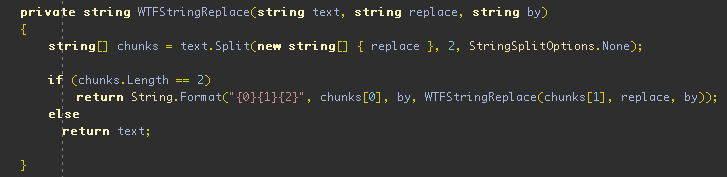
For those who are not familiar with XSLT syntax and here's the C# equivalent.  An excellent material for the thedailywtf! :)
 (Note: I'm not so sure, but I think in XSL 2.0 there is already a built-in replace function on strings)

Print | posted on Tuesday, April 1, 2008 8:36 PM

Feedback

# re: String.Replace() in XSLT

left by al at 7/31/2008 2:09 AM Gravatar
nice xslt!

# re: String.Replace() in XSLT

left by lavbox at 11/22/2008 1:36 AM Gravatar
Nice post.
I have written a string replace template too.
Check it out
http://lavbox.blogspot.com/2008/05/xsl-template-to-split-to-string.html

# re: String.Replace() in XSLT

left by Louisa Nicholson at 1/9/2009 9:34 PM Gravatar
Thanks a bunch for posting this - a software I'm using doesn't have the XSLT2 engine and I had to implement this functionality quickly in version 1 compliant code.

# re: String.Replace() in XSLT

left by A. OLMOS at 2/12/2009 4:41 AM Gravatar
Thank you for your post!!

# re: String.Replace() in XSLT

left by Noor at 2/16/2009 2:06 PM Gravatar
Very good example for String replace...

# re: String.Replace() in XSLT

left by Bohdan at 2/22/2009 11:37 PM Gravatar
Man you saved my life!!! Thanx a lot!!!

# re: String.Replace() in XSLT

left by Renato at 3/11/2009 10:31 PM Gravatar
Thank you, very good... but what if I want to replace only the first occurrence?

# re: String.Replace() in XSLT

left by mitcrellim at 3/14/2009 12:45 PM Gravatar
To only replace the first occurrence, simply take out the recursion call. Something like this:

<xsl:template name="string-replace-all">
<xsl:param name="text"/>
<xsl:param name="replace"/>
<xsl:param name="by"/>
<xsl:choose>
<xsl:when test="contains($text, $replace)">
<xsl:value-of select="substring-before($text,$replace)"/>
<xsl:value-of select="$by"/>
<xsl:with-param name="text" select="substring-after($text,$replace)"/>
</xsl:when>
<xsl:otherwise>
<xsl:value-of select="$text"/>
</xsl:otherwise>
</xsl:choose>
</xsl:template>

# re: String.Replace() in XSLT

left by ian at 3/20/2009 2:37 AM Gravatar
Thanks - that almost made life easy for me until I realized that all i needed for my particular case was the translate() function! So if anyone else sees this post and uses xslt too infrequently to remember how to do really basic things - translate will replace any instances of EACH CHARACTER with another, so it's good for single char stuff like stripping slashes!
http://www.w3schools.com/Xpath/xpath_functions.asp

# re: String.Replace() in XSLT

left by dominic at 3/22/2009 6:03 AM Gravatar
thank you, thank you!!

# re: String.Replace() in XSLT

left by dfd at 3/26/2009 5:43 PM Gravatar
good
dfdf

# re: String.Replace() in XSLT

left by laruiss at 4/17/2009 11:58 PM Gravatar
Just wanted to say : thank you :-)

# re: String.Replace() in XSLT

left by nk at 6/4/2009 4:50 PM Gravatar
How can we use above function to replace a quote (") by \" in given string.

# re: String.Replace() in XSLT

left by vn at 6/17/2009 2:58 PM Gravatar
how do we use above function to replace blank by <br> or next line? Pls let me know.

# re: String.Replace() in XSLT

left by fuck sake at 7/15/2009 2:01 PM Gravatar
why is the code not available for copy/paste????

# re: String.Replace() in XSLT

left by Andrew at 7/17/2009 10:19 AM Gravatar
Bitmaps? for code? Hello? Are you sane?

# re: String.Replace() in XSLT

left by ace at 7/22/2009 11:45 AM Gravatar
Dude Code Looks good but Need to be able to copy pate...gr8 work and help though ...u are a life saver

# re: String.Replace() in XSLT

left by sandy at 7/23/2009 5:13 AM Gravatar
thank you

# re: String.Replace() in XSLT

left by Marky at 8/13/2009 7:23 AM Gravatar
And here the whole stuff for copy-and-paste:

<xsl:template name="string-replace-all">
<xsl:param name="text" />
<xsl:param name="replace" />
<xsl:param name="by" />
<xsl:choose>
<xsl:when test="contains($text, $replace)">
<xsl:value-of select="substring-before($text,$replace)" />
<xsl:value-of select="$by" />
<xsl:call-template name="string-replace-all">
<xsl:with-param name="text"
select="substring-after($text,$replace)" />
<xsl:with-param name="replace" select="$replace" />
<xsl:with-param name="by" select="$by" />
</xsl:call-template>
</xsl:when>
<xsl:otherwise>
<xsl:value-of select="$text" />
</xsl:otherwise>
</xsl:choose>
</xsl:template>

# re: String.Replace() in XSLT

left by dust at 8/20/2009 10:54 AM Gravatar
A simple code for a great solution. Many thanks man.

# re: String.Replace() in XSLT

left by granadaCoder at 11/13/2009 12:58 PM Gravatar
Where's the code download?
Here is the sample test typed out. (Thanks to the person who typed out the implementation).

Thanks for the post.


<xsl:variable name="myVar">
<xsl:call-template name="string-replace-all">
<xsl:with-param name="text" select="'This is a sample text : {ReplaceMe} and {ReplaceMe}'" />
<xsl:with-param name="replace" select="'{ReplaceMe}'" />
<xsl:with-param name="by" select="'String.Replace() in XSLT'" />
</xsl:call-template>
</xsl:variable>

# re: String.Replace() in XSLT

left by Sabarish at 12/21/2009 10:15 AM Gravatar
This is what exactly I am looking for. Ton of thanks to you :-).

# re: String.Replace() in XSLT

left by meng at 12/23/2009 8:27 AM Gravatar
Thanks for the solutions, it helps!
But is there a way for me to replace "\n" Or any regular expression? Thanks in advance.

# re: String.Replace() in XSLT

left by Muhammad Mosa at 1/8/2010 6:06 AM Gravatar
Because I tried it and it worked with me from first time, with now headache I though to comment and thank you about it.
Clean good snippet.

# re: String.Replace() in XSLT

left by srinivas at 3/11/2010 5:01 AM Gravatar
helpfull template

# re: String.Replace() in XSLT

left by Shahid Jamil at 4/19/2010 3:56 AM Gravatar
Thanks so much for this simplified code. Nice one ....

# re: String.Replace() in XSLT

left by burim at 6/13/2010 11:56 PM Gravatar
It save my lift. Thanks!

# re: String.Replace() in XSLT

left by Sten Hougaard at 6/30/2010 5:47 AM Gravatar
@meng:
".But is there a way for me to replace "\n"."
Yes you can replace the two chars 13 and 13 to what you may wish to replace them with. That is you can set the parameter as such:
<xsl:with-param name="replace" select="'&#13;&#10;'" />


# re: String.Replace() in XSLT

left by Abhishek Patel at 7/12/2010 7:51 AM Gravatar
how can i replace double quotes(") with single quote(')

# re: String.Replace() in XSLT

left by Peter at 9/1/2010 3:13 AM Gravatar
Thank you. It works fine.

# re: String.Replace() in XSLT

left by Ravi Kumar Singh at 10/7/2010 10:08 AM Gravatar
Its a great post, it takes a good amount of hardwork and dedication to discover these piece of codes.
It is highly appreciated and thanks a ton to you...

# re: String.Replace() in XSLT

left by sierra at 11/16/2010 10:25 AM Gravatar
How about
translate()?
same syntax and same result! and nativ!

# re: String.Replace() in XSLT

left by Jason Green at 11/16/2010 3:18 PM Gravatar
@Abhishek Try &quot; and &apos;

@sierra I agree. translate() worked great for me.

# re: String.Replace() in XSLT

left by jes at 1/21/2011 2:59 AM Gravatar
Thank you! :)

# re: String.Replace() in XSLT

left by simplex at 2/25/2011 2:41 AM Gravatar
Here is how to replace multiple fragments in a string. This a kind of "translate":

<xsl:template name="string-translate">
<xsl:param name="text" />
<xsl:param name="replace" />
<xsl:param name="by" />
<xsl:param name="delimiter" select="';'"/>
<xsl:choose>
<xsl:when test="string-length($replace) > 0 and string-length($by) > 0">
<xsl:variable name="replace-delimited">
<xsl:choose>
<xsl:when test="contains($replace, $delimiter)">
<xsl:value-of select="$replace" />
</xsl:when>
<xsl:otherwise>
<xsl:value-of select="concat($replace, $delimiter)" />
</xsl:otherwise>
</xsl:choose>
</xsl:variable>
<xsl:variable name="by-delimited">
<xsl:choose>
<xsl:when test="contains($by, $delimiter)">
<xsl:value-of select="$by" />
</xsl:when>
<xsl:otherwise>
<xsl:value-of select="concat($by, $delimiter)" />
</xsl:otherwise>
</xsl:choose>
</xsl:variable>
<xsl:variable name="temp" >
<xsl:call-template name="string-replace-all" >
<xsl:with-param name="text" select="$text" />
<xsl:with-param name="replace" select="substring-before($replace-delimited, $delimiter)" />
<xsl:with-param name="by" select="substring-before($by-delimited, $delimiter)" />
</xsl:call-template>
</xsl:variable>
<xsl:call-template name="string-translate" >
<xsl:with-param name="text" select="$temp" />
<xsl:with-param name="replace" select="substring-after($replace, $delimiter)" />
<xsl:with-param name="by" select="substring-after($by, $delimiter)" />
<xsl:with-param name="delimiter" select="$delimiter"/>
</xsl:call-template>
</xsl:when>
<xsl:otherwise>
<xsl:value-of select="$text" />
</xsl:otherwise>
</xsl:choose>
</xsl:template>

The template is called as follows:

<xsl:call-template name="string-translate" >
<xsl:with-param name="text" select="http%3A%2F%2Fgoogle%2Ecom" />
<xsl:with-param name="replace" select="'%2F %3A %2E'" />
<xsl:with-param name="by" select="'/ : .'" />
<xsl:with-param name="delimiter" select="' '"/>
</xsl:call-template>

The result of the a.m. call will be: http://google.com

# re: String.Replace() in XSLT

left by XSLT Seeker at 3/9/2011 10:17 AM Gravatar
How to call this function multiple time?

something equivallent in C# as string.Replace(...).Replace(..)

# re: String.Replace() in XSLT

left by Stew Ashton at 3/23/2011 8:50 AM Gravatar
I am writing a generic XML to CSV xslt file, and I needed to double all quotes in the character fields since I am putting quotes around them.

I was able to do this in no time with your code. Many, many thanks...

# re: String.Replace() in XSLT

left by dkrs0001 at 3/24/2011 9:26 PM Gravatar
I need two double quotes replaced by an empty string. How do I do that in xsl? Thanks in advance.

# re: String.Replace() in XSLT

left by Sari at 3/29/2011 10:51 PM Gravatar
I tried with the string-replace-all function. It is working for most of the cases. But in one case alone I am getting the below exception,

Error
---------------------------
A Runtime Error has occurred.
Do you wish to Debug?

Line: 176
Error: The XSL processor stack has overflowed - probable cause is infinite template recursion.


---------------------------
Yes No
---------------------------
Can you give me some idea how it happened?

# re: String.Replace() in XSLT

left by Neelam at 4/21/2011 6:03 AM Gravatar
hey this works so swiftly... cool

# re: String.Replace() in XSLT

left by natural sciatica treatment at 4/21/2011 7:20 AM Gravatar
I think very good article. Nice design.Your site always offer some really interesting information. Thank you for sharing it with us.The information provide by you is very useful for me.thanks for sharing and hope you will share again.I just stumbled upon your blog and wanted to say that I have really enjoyed reading your blog posts. Any way I'll be subscribing to your feed and I hope you post again soon.

# re: String.Replace() in XSLT

left by dll file extension at 5/26/2011 7:04 AM Gravatar
What you posted is very good. I have been looking for a String.Replace functionality in XSLT 1.0, but I would have never hoped to find something that would allow me to take three parameters and recursively process the input text string. Thanks for uploading this!

# re: String.Replace() in XSLT

left by Kim at 8/24/2011 9:55 AM Gravatar
Improved version for multiple string replace:

[code]<xsl:template name="string-replace-all">
<xsl:param name="text"/>
<xsl:param name="replace"/>
<xsl:param name="by"/>
<xsl:param name="separator"/>
<xsl:choose>
<xsl:when test="$separator and contains($replace, $separator)">
<xsl:variable name="text2">
<xsl:call-template name="string-replace-all">
<xsl:with-param name="text" select="$text"/>
<xsl:with-param name="replace" select="substring-before($replace, $separator)"/>
<xsl:with-param name="by" select="substring-before($by, $separator)"/>
<xsl:with-param name="separator" select="$separator"/>
</xsl:call-template>
</xsl:variable>
<xsl:call-template name="string-replace-all">
<xsl:with-param name="text" select="$text2"/>
<xsl:with-param name="replace" select="substring-after($replace, $separator)"/>
<xsl:with-param name="by" select="substring-after($by, $separator)"/>
<xsl:with-param name="separator" select="$separator"/>
</xsl:call-template>
</xsl:when>
<xsl:otherwise>
<xsl:choose>
<xsl:when test="contains($text, $replace)">
<xsl:value-of select="substring-before($text,$replace)"/>
<xsl:value-of select="$by"/>
<xsl:call-template name="string-replace-all">
<xsl:with-param name="text" select="substring-after($text,$replace)"/>
<xsl:with-param name="replace" select="$replace"/>
<xsl:with-param name="by" select="$by"/>
</xsl:call-template>
</xsl:when>
<xsl:otherwise>
<xsl:value-of select="$text"/>
</xsl:otherwise>
</xsl:choose>
</xsl:otherwise>
</xsl:choose>
</xsl:template>
[/code]

# re: String.Replace() in XSLT

left by Olde Fortran 77 at 9/23/2011 10:24 AM Gravatar
Thank you. This works nicely.

# re: String.Replace() in XSLT

left by Rüdiger at 10/3/2011 3:34 AM Gravatar
Thanks for posting this! S I didn't have to reinvent the wheel. I recently incorporated the template in my JSON builder (http://ruediger-plantiko.blogspot.com/2011/09/ein-json-builder-in-abap.html).

# re: String.Replace() in XSLT

left by sandeep at 10/23/2011 1:11 AM Gravatar
Dear's

Assuming that Parameters are not passed from param & will be declard within the XSLT script.Can anybody Pls help me to get the exact code.

# re: String.Replace() in XSLT

left by wh at 10/25/2011 11:43 AM Gravatar
awesome. thanks!

# re: String.Replace() in XSLT

left by MBM at 12/17/2011 10:44 AM Gravatar
Very helpful, saved me the trouble of having to write my own. Thanks for sharing!

# re: String.Replace() in XSLT

left by Moussa at 2/7/2012 1:36 PM Gravatar
Thank you sir

# re: String.Replace() in XSLT

left by Ahmun at 2/9/2012 12:58 PM Gravatar
Any hints on how to replace the ampersand?

For setting up the replace parameter I tried:
<xsl:with-param name="replace" select="'&'" />
<xsl:with-param name="by" select="'%26'" />
And that threw an error.

I then tried:
<xsl:with-param name="replace" select="'&amp;'" />
<xsl:with-param name="by" select="'%26'" />
And no error, however, the return variable was an empty string.

I ended up using some crazy combination of FIND and REPLACE function use in a calculated column.

What I'm trying to accomplish is present a list of contractors in a custom list where clicking their name will direct the user to another page with the contractor's name as a querystring value. Something like "Father & Son Contractor" would throw off my querystring since the ampersand is the delimiter for multiple querystring params.

# re: String.Replace() in XSLT

left by Gaurav Balyan at 4/12/2012 2:56 AM Gravatar
good one.

# re: String.Replace() in XSLT

left by Antony at 5/28/2012 8:25 AM Gravatar
Very good useful material..helped me in critical circumstance in my project .... Thanks a lot

# re: String.Replace() in XSLT

left by Yeshwant Kakad at 6/12/2012 3:18 AM Gravatar
Hi, I tried to use above function for replacing &lt with < but it failed. I copied same function but it does not accept '<' or "<". See the error:
The content of elements must consist of well-formed character data or markup.

Can anybody please tell me how to replace &lt with < sign? thanks. Yeshwant

# re: String.Replace() in XSLT

left by Web Design Macclesfield at 6/22/2012 9:20 AM Gravatar
Does anybody know if there is there an "ends-with" type function.. whereby I can detect if the string ends with a dot, and if so I can then trim it off?

I am trying to have some text followed by ... (3 dots)

but if the text already has a dot, then I end up with 4 dots (....)

A niggle I know, but would be good if I could fix it.

# re: String.Replace() in XSLT

left by David McCormick at 9/2/2012 10:50 AM Gravatar
Excellent; thanks.

# re: String.Replace() in XSLT

left by Olivier at 3/27/2013 12:55 AM Gravatar
For those using XSLT with PHP, here's a version which use <xsl:processing-instruction /> :

[code]<xsl:template name="string-replace-all">
<xsl:param name="text" />
<xsl:param name="replace" />
<xsl:param name="by" />
<xsl:processing-instruction name="php">
echo str_replace('<xsl:value-of select="$replace" />', '<xsl:value-of select="$by" />', '<xsl:value-of select="$text" />');
</xsl:processing-instruction>
</xsl:template>[/code]
Post A Comment
Title:
Name:
Email:
Website:
Comment:
Verification: