
I had a situation where I had to deserialize a small chunk of JSON-formatted data and I didn’t want to create a class for it since it was a very specific use and I was confident there wasn’t a need to reuse it elsewhere in the application.
If I did have a class defined for the JSON data, I could easily use JSON.NET’s JsonConvert.DeserializeObject method:
1: string myJson = "[{id: 10, typeID: 4},{id: 100, typeID: 3}]";
2: MyObject obj = JsonConvert.DeserializeObject(myJson);
3: Console.WriteLine(obj[0].id);
So this is easy to do, but I really didn’t want to define a MyObject class for a one-time use. So I thought I’d go the route of an anonymous type and use JSON.NET’s JsonConvert.DeserializeAnonymousType method. I thought it was a bit vague how to use this since it asks for a type parameter – but since my output will be an anonymous type, what would my type parameter be?
Well, the best way that I came up with in a short period of time was to define a dummy anonymous type and pass it to the JsonConvert method. It’s a little bit of overhead and an extra line of code, but it does work.
1: string myJson = "[{id: 10, typeID: 4},{id: 100, typeID: 3}]";
2: var dummyObject = new[] { new { id = 0, typeID = 0 } };
3: var myObjects = JsonConvert.DeserializeAnonymousType(myJson, dummyObject);
4: Console.WriteLine(myObjects[0].id);
The slightly confusing part was the Intellisense provided by JSON.net:
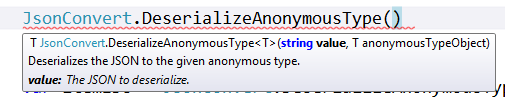
Seeing the ‘T’ type parameter makes you think you need a call to typeof or something similar. But in the case of deserializing to an anonymous type, you just need an instance of the anonymous type.
I thought I may have been missing something, but a little Bing research showed that there were similar approaches taken (see and here).