
In this post, I will show you how to compress the Asp.net Ajax Web Service response, To understand the benefits of compression let us start with a simple example, Consider you have an web service which returns a large data like the following:
[WebMethod] public string GetLargeData { using (StreamReader sr = File.OpenText(Server.MapPath("~/DataFile.txt"))) { return sr.ReadToEnd; } }
The web method reads an large text file (around 100KB) and returns it contents. Once we call this method from a page the network activity in the firebug shows like the following:
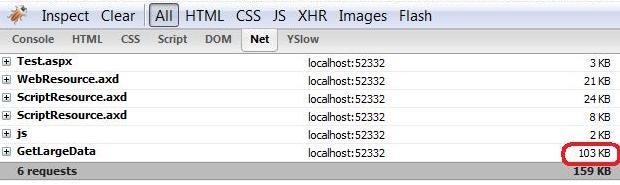
Now, lets examine the HttpModule which compress the Ajax Web Service response. The following shows the complete code of this module:
using System; using System.IO; using System.IO.Compression; using System.Globalization; using System.Web;
public class JsonCompressionModule: IHttpModule { public JsonCompressionModule { }
public void Dispose { }
public void Init(HttpApplication app) { app.PreRequestHandlerExecute += new EventHandler(Compress); }
private void Compress(object sender, EventArgs e) { HttpApplication app = (HttpApplication)sender; HttpRequest request = app.Request; HttpResponse response = app.Response;
//Ajax Web Service request is always starts with application/json if (request.ContentType.ToLower(CultureInfo.InvariantCulture).StartsWith("application/json")) { //User may be using an older version of IE which does not support compression, so skip those if (!((request.Browser.IsBrowser("IE")) && (request.Browser.MajorVersion <= 6))) { string acceptEncoding = request.Headers["Accept-Encoding"];
if (!string.IsNullOrEmpty(acceptEncoding)) { acceptEncoding = acceptEncoding.ToLower(CultureInfo.InvariantCulture);
if (acceptEncoding.Contains("gzip")) { response.Filter = new GZipStream(response.Filter, CompressionMode.Compress); response.AddHeader("Content-encoding", "gzip"); } else if (acceptEncoding.Contains("deflate")) { response.Filter = new DeflateStream(response.Filter, CompressionMode.Compress); response.AddHeader("Content-encoding", "deflate"); } } } } } }
Next, register this module in the web.config like the following:
<httpModules> <add name="ScriptModule" type="System.Web.Handlers.ScriptModule, System.Web.Extensions, Version=1.0.61025.0, Culture=neutral, PublicKeyToken=31bf3856ad364e35"/> <add name="JsonCompressionModule" type="JsonCompressionModule"/> </httpModules>
This time the network activity shows like the following:
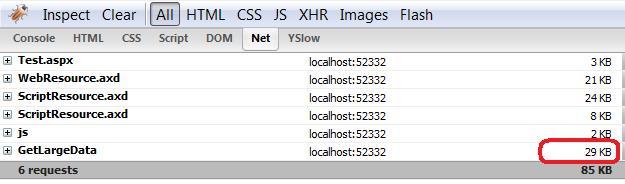
So by adding this little module, we have saved 74KB. Now consider the impact of this in an highly traffic ajax web application:-). You will find the complete source code in the bottom of this post. If you want to learn more optimization tips check out my previous post Implement Yahoo's YSlow in your Asp.net pages and Combine Multiple JavaScript and CSS Files and Remove Overheads.
Download: Full Source