
One of my first Windows applications was an Access 2.0 database. Man has Access changed since then! Recently one of my customers needed to be able to source control some of their Access 2003 database. I knew about the MSSCCI provider for TFS, but I had not used if for Access before.
Here is what I did to get this working:
- Installed the Access source control Add-in
- Installed the Office 2003 SP 3
- Installed KB 945674 (this fixes a problem with source control)
- Installed the TFS MSSCCI provider
Once everything was setup, I got this error when I tried to create the .mdb from TFS:
Failed to import file 'C:\path\file name.acf' into Microsoft Access.
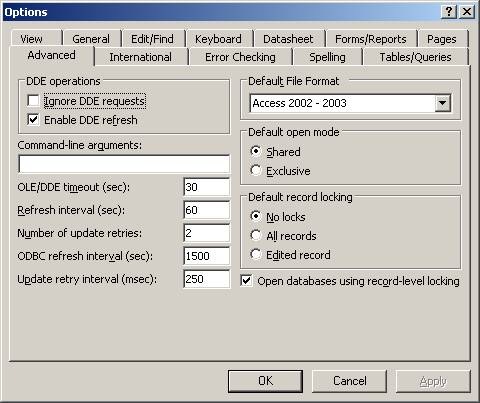
Grant Holiday (now a blue badge) found the fix for me. Turns out to be a setting in the options of Access on the Advanced tab. The Default File Format must be set to “Access 2002 – 2003”.
Here is where you set this:
Hope this helps you.
Happy Coding!