
Marko Apfel

C#, Architecture, QA, Coach, GIS, ArcGIS, ArcObjects

  Home  |   Contact  |   Syndication    |   Login
  144 Posts | 2 Stories | 73 Comments | 4 Trackbacks

News


Twitter | LinkedIn | Xing

Twitter


Article Categories

Archives

Post Categories

BizTalk

C#

Enterprise Library

SAP

SQL Server

Technologie

I tried to format my camera SD-card and my windows comes up with the error:
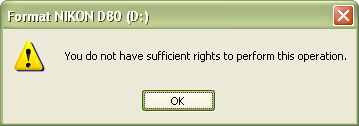
 

A little bit google helped:

Starting management console as lokal administrator
Start | Run | Open: runas /user:<LokalAdmin> mmc.exe

Adding group policy snap-in
File | Add/Remove Snap-In… | Add… | Group Policy Object Editor | Add | Finish | Close | OK

Browse to security policy

Console Root | Local Computer Policy | Computer Configuration | Windows Settings | Security Settings | Local Policies | Security Options

Pimp the privileges for non administrative users
Open policy “Devices: Allowed to format and eject removable media”
Set value to: “Administrators and Interactive Users”
OK
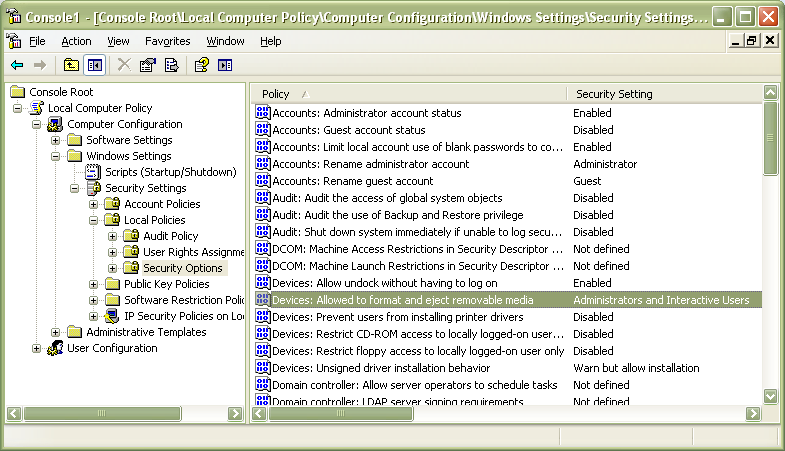
After logging out and newly logging in formatting is possible.


posted on Thursday, December 03, 2009 1:49 AM

Feedback

# re: Formatting removable media throws “You do not have sufficient rights to perform this operation.” 1/14/2010 6:35 AM soni
Not opening

# re: Formatting removable media throws “You do not have sufficient rights to perform this operation.” 11/11/2010 1:40 AM Joe
would you by any chance know how to do this with a microsd that is used for an r4 for DS?

# re: Formatting removable media throws “You do not have sufficient rights to perform this operation.” 5/25/2011 2:19 PM ali
you do not have suffcient rights to perfrom this operation

# re: Formatting removable media throws “You do not have sufficient rights to perform this operation.” 6/15/2011 2:22 PM Suzi Rowley
I am trying to attach, in an email, several photos that I have burned to a DVD and I get the message "you do not have sufficient rights to perform this operation". Why don't I have that right? What should I do?

# re: Formatting removable media throws “You do not have sufficient rights to perform this operation.” 6/15/2011 5:50 PM Marko Apfel
@soni: what is not opening?
@joe: i dont understand your question
@suzi: sounds like a similar permission problem - maybe one of the "Devices: Restrict ...". you should try to play with these one.

# re: Formatting removable media throws “You do not have sufficient rights to perform this operation.” 1/14/2012 9:15 PM Donnie
Restart your machine. Unless you aren't an admin.

# re: Formatting removable media throws “You do not have sufficient rights to perform this operation.” 3/29/2012 8:23 PM IoNGhiDoN
Man thank you a lot! i disconected my flash drive while format and this fixed my card because couldn't recognize it anymore:D so thanks again .

Post A Comment
Title:
Name:
Email:
Website:
Comment:
Verification: