
Thank you Microsoft, for once again bypassing my Windows update policies. I can now go explain to my managers why 500 workstations and 12 servers have ended up with Microsoft Desktop Search, without anyones explicit approval. To illustrate how totally stupid this is, check out these screenshots out of our WSUS box:
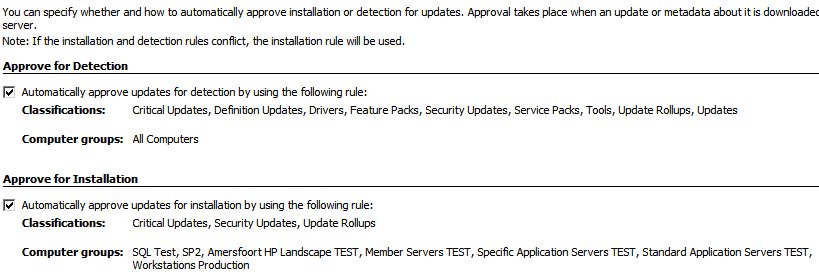
As you can see above, our current update policy only allows Security updates, Critical Updates and Security Roleup Packs to be automaticly installed ("Approve for Installation") on select computer groups (most of them test groups)
All other catagory of updates are set to "detect only" for all computers. Meaning that all other update catagories, including the "update" categorie are only detected, so I can see what systems are actually asking for a non-security update, and approve them when needed. Updates under these catagories are not installed automaticly.
Just to re-itterate: Updates of the "Update" categorie, are only suppose to automaticly be "Approve for Detection". And not "Approve for Installation"
So imagine my horror, when yesterday, after several frantic phonecalls from my support teams, I found 5 particular updates as follows:

These 5 updates where pushed on the 23rd of October, together with a bunch of Internet Explorer Security Roleup pack updates not listed here.
The alarming thing about the above list, is the Appoval column.
Its set to Install.
I never approved these updates for installation.
These updates are suppose to be automaticly set to "Approve for Detection" only. What is even worse, is that, not only are they set to "Install", they are set to "Install" for "all computers.", which ignored any of my predefined computer groups. You can see that here:
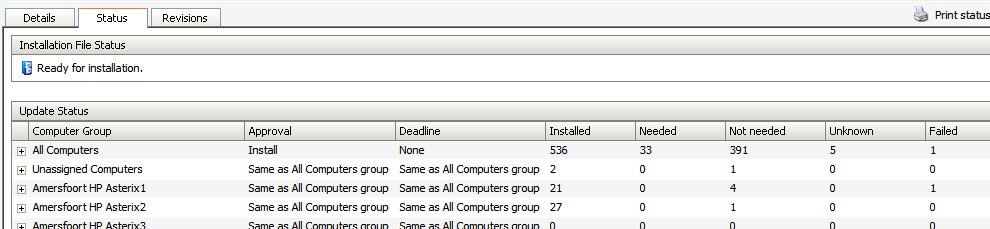
These 5 updates, totally and utterly ignored the settings if our WSUS server, and did its own thing, installing forcefully on every single system in WSUS, inluding servers such as SQL servers, file servers, and several domain controllers.
I didnt even think it was technicly possible that these updates could override the WSUS server settings. This proves they can, and moreover, in the largest Microsoft update fuckup to date, that Microsoft has more control over what updates you recieve in your Enterprise, than your own administrators.
The question now is, how this could have happened. Was this a mistake on Microsofts part? Perhaps, because it was also the .net Framework 3.0 that was approved in this way. One can theorise about MS wanting to forcefuly push MS Desktop Search as some kind of play against Google desktop, sure, but .Net 3.0 too? And at the same time? Surely they would have known what kind of shitstorm this would cause!
So my money is on an honest-to-god mistake on Microsofts part. We can probably expect some kind of enterprise Desktop Search de-installation tool in the next week or so.. perhaps ;)
In the meantime, administators and IT managers around the world, are going to have to ask themselves weather they still trust Microsoft. Especially considdering that whatever they push can apparently override server-specific settings.
-------------------------------------------------------------------------
Update:
Microsoft WSUS team have responded with a post here
I responded on that post with the following:
I blogged about this happening to me here:
https://geekswithblogs.net/jemimus/archive/2007/10/25/116319.aspx
Now i I understand the above correctly...
There is a good chance I approved for installation, the update to Windows Desktop Search back in february.
I would have done that in the understanding that it would apply -only- to systems that already had the Windows Desktop Search tool installed.
That understanding has come from the behavior of Microsoft updates in general: -Updates- to components of Windows and other applications, only apply to systems that have that component or application installed.
Makes sense. After all: You cannot update software that isn't installed in the first place... cause its not there yet.
Now what I understand from the post above, is that the update revision 105, released a few days ago, is not simply an update.
It is in fact the entire Windows Desktop Search installer, with the ability to also replace/update previous installations.
And because of the WSUS feature to always aprove new revisions is also turned on on my WSUS server, 105 was also, automaticly approved. Cause its a -revision- of the feb update.
However.. you changed the scope of applicability of 105.
In my opinon, this is a very dangerous sequence of events, because the logic is not apparent to most admins I am guessing (based on what I have read so far).
The combination of both a revision, -and- a scope change at the same time, seems an inherently bad choice.
For all intense and purpose, the effect of the scope change for clients that did not have the WDS previously installed, does not constitute an -update-, and it should not be presented as such.
That means it should have been presented as a completely seperate item in WSUS, and should not have included the wording "update" anywhere in the discription.
I have read on the thread here: http://episteme.arstechnica.com/eve/forums?a=tpc&s=50009562&f=12009443&m=796005818831&r=845007818831
that exactly the same thing happened with "Client Update for Microsoft Forefront Client Security (1.0.1703.0)", which similarly was extended in scope.
The term "update" should mean just that. You should not be using the term so generically, and wrapping up "new" installation functionality into one and the same package.
Keep it separate. Keep the language clear to us admins who have probably very little time to devote to patch management already.
--------------------------------------------------------------------
Update 2
Copy-paste of my comment on the Microsoft Update product team blog
After reading this:
I have a better understanding of what might have happened. And it seems like the behavior is by design.
However, I believe the way this update was packaged and presented, undermines the logic we have come to expect from WSUS updates.
The problem is that the package is presented internally as a revision -update-, which are by default -always- automatically approved (your other approval settings don't override this), but it was combined with a scope change, that allowed the package to also install WDS on systems that did not have it previously.
It is the second behavior that causes the problem. Installation on systems that did not have it previously, is NOT an -update-, they should not behave as such.
Revision 105 was called "Windows Desktop Search 3.01 for Windows XP (KB917013)". Classification: Update
Now from the name alone, it looks like its not an update, but a complete installation (which it was). I never got to see the name before the fact of course, because it auto-approved and installed itself.
The classification is "Update", and this is what troubles me. Surely, if this "update" can install itself on systems without previous revisions, it does not belong in the "update" classification?
This should have been split into 2 packages.
1. An -update- with new revision number 105, possibly with a slighty differnet name including the word "update". This would have been automatically approved if the default option for revisions auto-approving was not altered by the admin. The scope would be only install on systems with previous revisions of WDS
2. A new package, called "Windows Desktop Search 3.01 for Windows XP (KB917013)", possibly a new revision number, but certainly a different classification. I don't have a list of all the WSUS classifications here, but I am sure there is one that is suitable, wasn't their something for new Windows features?
-------------------------------------------------------