
[Switch to "Elastic Layout" to see this properly.]
I get a lot of mileage using Web Services inside an intranet. I sometimes need to cross operating systems and languages to take advantage of pre-written services. One issue I've run across is the need to find the correct syntax in different languages that will generate a correct result. Some implementations are really easy and others require some delicate, precision work in order for them to respond correctly. Once written, however, they are consistent in their performance.
In this example, I've taken a minor Web Service (function: GetWeather(String City)) that returns random weather information when given a city. This is just for fun and to test parameters on Web Service calls. The service is at:
http://www.deeptraining.com/webservices/weather.asmx
This page has no HTML test page built for it, so your actual call will need to be the entity performing the test.
When a successful call is given, the responses are in the range of: Rain, Sunny, Partly Cloudy, Cloudy, etc. Here is a sample result of three runs from the Ruby version:
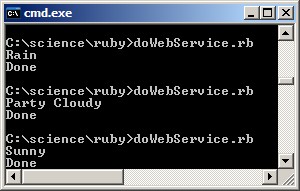
If anyone wants to create the Scala and/or Python versions (before I do), I will gladly post them here.
FYI: Perl and Java were the most difficult / cumbersome and C++ was the easiest.
Here is the PHP version:
GetWeather(array('City' => 'Murfreesboro'))\->GetWeatherResult; echo $strWeather. "\\nDone"; } doWebService; ?>Here is the Ruby version:
require 'soap/wsdlDriver' # Include the soap driver require 'SuppressWarning' # Suppress the soap unused param warning
################################################################################ # Call to a web service on the Internet (passing a parameter) def doWebService # Instantiate a soap driver for the given service and NameSpace # Call the return from the driver creation, pass it a parameter and # Append "Done" to the end of that # of course, this is now unReadable... puts ( soap = suppress_warning { SOAP::WSDLDriverFactory.new( 'http://www.deeptraining.com/webservices/weather.asmx?WSDL' ).create_rpc_driver } ).getWeather({'City' => 'Murfreesboro'}).getWeatherResult+"\nDone" end
doWebService
----------------------------[SuppressWarning.rb]----------------------------
def suppress_warning back = $VERBOSE $VERBOSE = nil begin yield ensure $VERBOSE = back end end
Here is the Perl version:
## WORKS as of 03/06/2010 use strict; use SOAP::Lite;
############################################################################### sub doWebService { my $FUNCTION = 'GetWeather'; my $strParamName = 'City'; my $strParamValue = 'Murfreesboro'; my $strNamespace = 'http://litwinconsulting.com/webservices';
############################################################################# # Set the value of ACTION to the value you need passed in the # SOAPAction header # Init the WebService my $soap = SOAP::Lite ->proxy('http://www.deeptraining.com/webservices/weather.asmx') ->on_action(sub { return "$strNamespace/$FUNCTION"; } ) ->ns("$strNamespace/");
##################### # Call the WebService my $resp = $soap->call( SOAP::Data->name("$FUNCTION")->attr({xmlns => "$strNamespace/"}), SOAP::Data->name($strParamName => $strParamValue) );
######################################################### # Since the result comes back as a string, just print it. return $resp->result; }
print &doWebService; print "\nDone\n";
Here is the Java version:
import java.util.*; import java.io.*; import java.net.URLConnection; import java.net.MalformedURLException;
import org.apache.axis.client.Call; import org.apache.axis.client.Service; import org.apache.axis.encoding.XMLType; import javax.xml.namespace.QName; import javax.xml.rpc.NamespaceConstants; import javax.xml.rpc.ParameterMode; import java.net.URL;
public class doWebService { public static void doWebServiceCall { try { //////////////////////////////////////////////////////////////////// // Responds the same with or without the?WSDL String strEndPoint = "http://www.deeptraining.com/webservices/weather.asmx"; String strSoapAction = "http://litwinconsulting.com/webservices/GetWeather"; String strSchemaURL = "http://litwinconsulting.com/webservices/"; String strParamName1 = "City"; String strParameterVal1= "Murfreesboro"; String strFunctionName = "GetWeather";
//Call call = (Call) new Service.createCall;//Works Call call = new Call(strEndPoint);//Works same
//////////////////////////////////////////////////////////////////// // first parameter in QName seemingly takes ANYTHING call.setOperationName(new QName(strSchemaURL, strFunctionName));
//////////////////////////////////////////////////////////////////// // Set the name of the parameter and the return type call.setReturnType(XMLType.XSD_STRING); call.addParameter(new QName(strSchemaURL,strParamName1), XMLType.XSD_STRING, ParameterMode.IN); // //////////////////////////////////////////////////////////////////// // Catch the result and print it // Parameter count is now ONE (1). call.setSOAPActionURI(strSoapAction);//Yes Necessary String strResult = (String) call.invoke(new Object[] {strParameterVal1}); System.out.println("Result='" + strResult + "'"); } catch (Exception e) { e.printStackTrace; System.err.println(e.toString); } }
public static void main(String[] args) { //////////////////////////////////////////////////////////////////////// // 6 Call a Web service (with parameters) doWebServiceCall; } }
Here is the C++ version (once the WS is added to the project):
// doWebService_CPP.h #pragma once using namespace System; using namespace WS_WEATHER;
namespace doWebService_CPP {
public ref class CDoWebService_CPP { public: static void DoWebService(void) { Weather^ svcWeather = gcnew Weather; Console::WriteLine(svcWeather->GetWeather("Murfreesboro") + "\nDone"); } }; }
Here is the VB version (once the WS is added to the project):
Public Class CDoWebService_VB Public Shared Sub DoWebService Dim svcWeather As New WS_WEATHER.Weather Console.WriteLine(svcWeather.GetWeather("Murfreesboro") & Chr(10) & "Done") End Sub End Class
Here is the C# version (once the WS is added to the project):
using System; using doWebService_CS.WS_WEATHER;
namespace doWebService_CS { public class CDoWebService_CS { public static void DoWebService { Weather svcWeather = new Weather; Console.WriteLine(svcWeather.GetWeather("Murfreesboro") + "\nDone"); } } }
Here is the PowerShell version (borrowing from the C# version):
################################################################################ # Instead of attempting to dynamically reference a WebService, I leveraged the # existing connection through a DLL created in C# in an earlier example. # This example shows the loading of the DLL # how to call a static method with PowerShell [void][Reflection.Assembly]::LoadFile( "c:\science\managed\doWebService_CS\bin\Debug\doWebService_CS.dll")
[doWebService_CS.CDoWebService_CS]::DoWebService
## For a more thorough look at PowerShell and WebServices, check: