
UC The Future
Covering all things Microsoft UC!

Verifying Office 2010 SP1 Installation

Thursday, June 30, 2011 10:47 AM

So you downloaded and installed SP1, but now you want to verify that SP1 actually installed!

Looking at Outlook's Help Screen under Help->About, it isn't readily apparent that SP1 is installed.
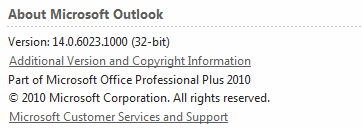
Like me, you probably expected to see 14.1.something. Perhaps 14.0.something SP1, right?

If you click on that "Additional Version and Copyright Information", another window will pop up and show you a bit more useful info (if you don't have the version numbers committed to memory)
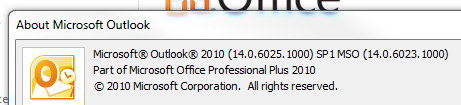
That window *does* give us that comforting SP1, and now we can determine that if you have Office 14.1.6023.1000 (and beyond) you are indeed runnning Office 2010 SP1!


Feedback

# re: Verifying Office 2010 SP1 Installation

Thanks! Worked for me. 7/13/2011 6:12 PM | User

# re: Verifying Office 2010 SP1 Installation

This is *exactly* what I was looking for.

Remember when checking the version was simple?

Like selecting "Help" and then "About" from the menu?

How hard is it really to put an "SP1" in the version line anyway?

Aloha,
Jonathan Spangler 8/11/2011 12:42 PM | Jonathan Spangler

# re: Verifying Office 2010 SP1 Installation

Thanks, I am seeking the information, it is very useful for me. 9/26/2011 1:23 AM | Ethan

# re: Verifying Office 2010 SP1 Installation

So how do I determine that MSO 2010 SP1 is installed from a script? Is there a registry key that I can reliably refer to?

Thanks. 9/29/2011 11:42 AM | JP

# re: Verifying Office 2010 SP1 Installation

no coment I need installeded office 2011 programme thanks
10/15/2011 6:09 AM | rachman ahmadi

# re: Verifying Office 2010 SP1 Installation

Determining the installed version should be an easy task, but thanks Microsoft it got more and more difficult.

First of all, they removed the "About"-screen from where you'd normally expect it (at the help-symbol).
Instead, now you have to enter the "File"-menu and enter the "help"-submenu.
If you got that far, you think that you found the version information string, but "SP1" is missing. So from this version information window, you have to oben another version information subwindow.

Thinks get worse and worse with Microsoft Office, and this was just ONE example. They should have kept it the way it's always been, until Office 2003.

Thanks for this hint, anyway! 10/24/2011 10:45 AM | Karl Schoberling

# re: Verifying Office 2010 SP1 Installation

thanx its useful & very helpful answer 11/2/2011 3:27 AM | farhan nawaz

Post a comment